With Idura, you can verify callers directly inside Genesys Cloud, either from the agent's screen or your IVR.
Does your contact center run on Genesys Cloud?
If so, Idura lets you verify callers using eIDs without ever leaving Genesys.
This means your agents can stop relying on outdated methods like security questions and national ID numbers as proof of a caller's identity. Neither your agents nor your callers need to learn anything new: Agents keep using familiar Genesys screens, and callers authenticate using their existing eID app.
Two ways to verify a caller
Our Genesys integration supports two different flows.
1. Verify from the agent's screen
In this case, Idura appears as a panel in the Agent Workspace, right next to the call.
Your agent picks the caller's eID type, enters their ID number, and clicks Start. The caller receives a notification on their phone and approves the request using their eID app. The agent now sees the caller's verified name and can continue the conversation.
Here's an example:
2. Verify via your IVR before an agent picks up
You can also set up the same check to run automatically in your phone menu.
The caller punches in their ID number, approves the request in their eID app, and is already verified when they reach the agent.
Ready-made IVR templates for Genesys
We provide starter IVR templates for each supported eID, built in Genesys Architect.
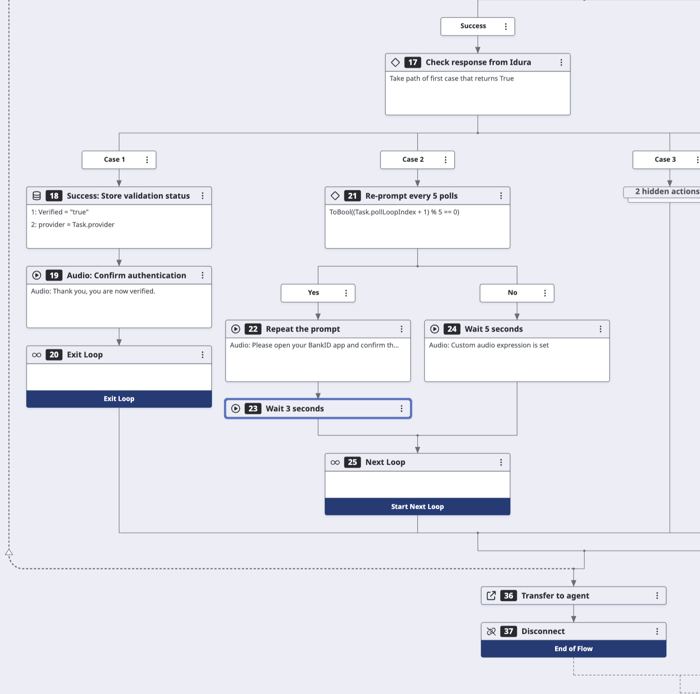
Each template includes the most common steps:
-
Greeting the caller
-
Collecting their ID
-
Routing them to the right eID flow
-
Running the eID verification
-
Tagging callers as verified (including which eID they used)
You can freely customize the templates, such as removing any eIDs you don't offer or irrelevant steps.
Supported eIDs
We support a range of eIDs for Caller Authentication in Genesys, including:
-
MitID (Denmark)
-
BankID (Sweden)
-
BankID (Norway)
-
Freja eID (Sweden, Denmark and Norway)
-
Vipps MobilePay
For an up-to-date list, please see the documentation page.
Tailored to each eID
eIDs have their own requirements for verifying someone over the phone. The Idura panel incorporates them into the flow, so your agents simply follow the on-screen steps.
Swedish BankID: Who made the call?
Your agent can mark whether the customer called you or you called them before entering the personal identity number.
Norwegian BankID: Confirming a keyword
Your agent reads out a keyword (typically a short number), so the caller can check if the same keyword shows up in their BankID app before approving.
Vipps MobilePay: Identify via phone number
Vipps MobilePay identifies the caller via phone number, so your agent enters that instead of their national ID.
Let your agents decide when to verify callers
You don't have to verify every caller.
Your agents can kick off the eID check only for especially sensitive topics like a change of address or personal details, financial transactions, and so on.
This helps lower your eID transaction costs and shortens your handling time for non-sensitive calls.
How to set things up
Your Genesys admin can add the Idura widget as a Client Application integration, customize which agents can see it, and import the necessary IVR templates directly.
Credentials stay inside your Genesys org, and the integration works in any Genesys Cloud region.
We can also help you set things up on the Idura side and walk you through the rest, so you can run a pilot without custom development.
Once you're up and running, you can manage your agents and their access directly in Genesys, just as you do with the rest of your setup.
Get started with Caller Authentication
On Genesys Cloud?
Get in touch with us to discuss your needs or create a free sandbox to test our platform.
For technical details, consult our Caller Authentication documentation.